
I started this article because I struggle with where the menu item for deploying the reports is. That may sound silly, but screen shots are my friend.
So:

Once there, fill in the form and press deploy. It should look vaugely like this. I generally ignore the CRM grid in the middle; I'm rarely involved in CRM deploys:
This last one gave me fits getting installed, I'll detail here the issues encountered.
EDIT 9/8/2015: I had luck solving the error below by running GP as Administrator.
The SQL Server Reporting Services setup information is not valid

There is a good blog entry here (https://community.dynamics.com/product/gp/gptechnical/b/dynamicsgp/archive/2012/10/11/dynamics-gp-ssrs-report-deployment-errors.aspx) that covers this issue, my particular problem was the last one, one of the dlls was missing. I went to another customer install and copied the dll over and got past this error.
The deployment exceeded the maximum request length allowed by the target server. Set maxRequestLength="20690" in the web.config file and try deploying again.

I thought this was cryptic. What web.config file? and where in the file to add the attribute? I got some help from Mariano Gomez (not the first time for that) here (http://dynamicsgpblogster.blogspot.com/2011/07/ssrs-deployment-has-exceeded-maximum.html).
EDIT 9/8/2015 - I found this on a non-standard drive today (d:)
SQL 2005: C:\Program Files\Microsoft Sql Server MSSQL.3\Reporting Services\ReportServer.
SQL 2008: C:\Program Files\Microsoft SQL Server\MSRS10_50.MSSQLSERVER\Reporting Services\ReportServer
SQL ?: C:\Program Files\Microsoft SQL Server Reporting Services\SSRS\ReportServer\web.config
SQL 2016: C:\Program Files\Microsoft SQL Server \MSRS13.MSSQLSERVER\Reporting Services\ReportServer
But harder was the location in the file to add the attribute. Again, we'll thank Mariano for this:

(in part)
rsItemNotFound
The item 'Report Models/<companyName>/<companyName>_Inventory' cannot be found.
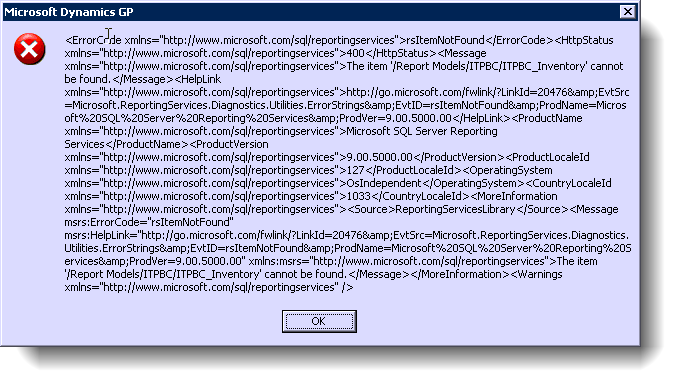
Since we'd had two different failures in the install, I just ran the install again and it fixed itself.
rsItemNotFount400The item '/<companyname>/Purchasing/Charts and KPIs' cannot be found.

After installing the Dynamics reports on SQL 2005, we started getting the above error. The bottom line is that the KPIs are not installed on SQL 2005, only on SQL 2008. The fix to get rid of the errors is described here:
http://dynamicssmallbusiness.blogspot.com/2011/07/rsitemnotfound-error-when-clicking-on.html
But I really don't like what is proposed there. I found a simpler way - go into SSRS and add the path. Just add a folder that is called 'Charts And KPIs' to the appropriate company. That stops the errors neatly.